Archlinux Mail
Archlinux Mail
安装
1 | sudo pacman -S s-nail |
编辑配置文件
sudo vim /etc/mail.rc
1 | set from="<USERNAME>@qq.com" |
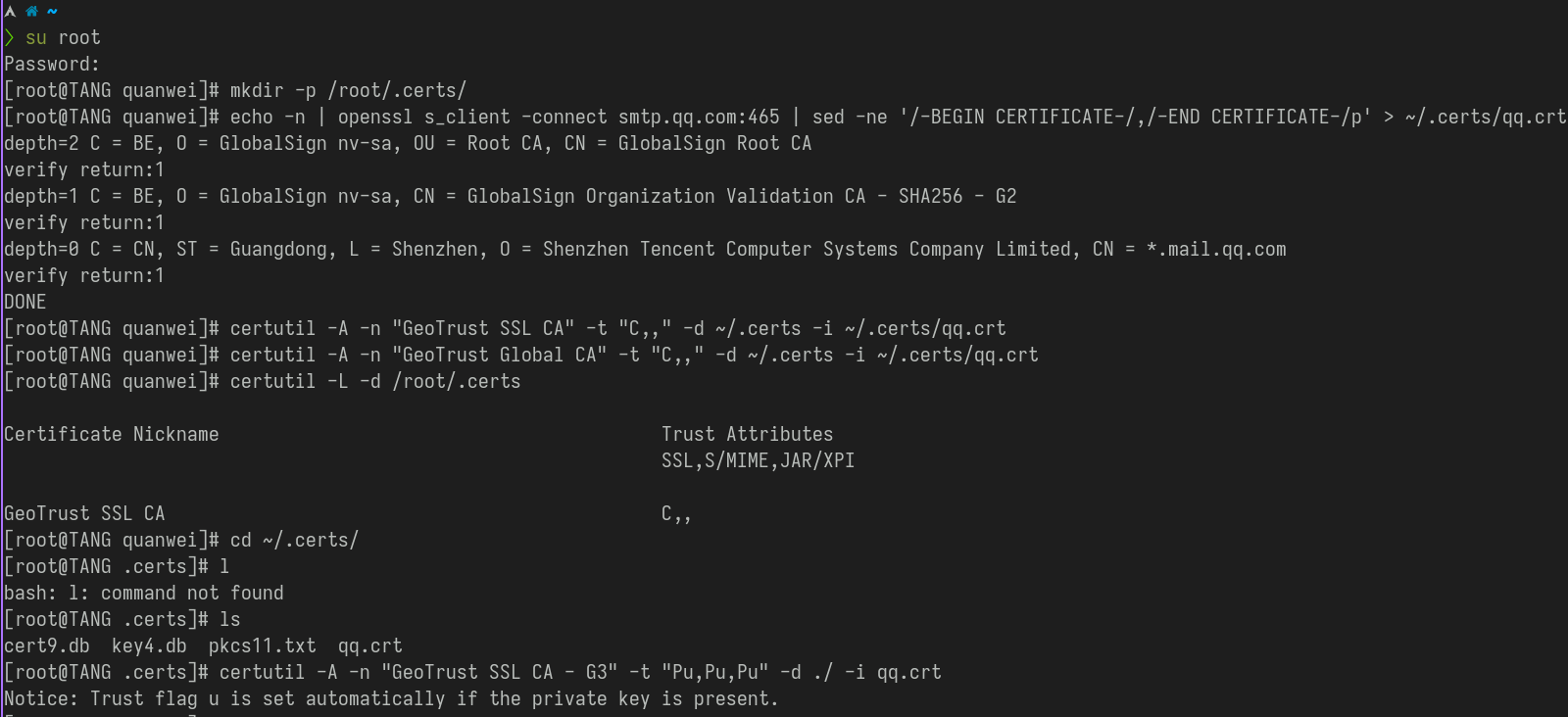
获得邮箱的SSL证书并存放到本地
最后一行的nss-config-dir就是制定的存放QQ邮箱SSL证书的位置
手动的获取QQ邮箱的证书保存到本地指定的目录里以备调用和验证
1 | su root |
测试
1 | mailx -s "TEST FROM LINUX" xxx@qq.com < ./mail_file.txt |
本博客所有文章除特别声明外,均采用 CC BY-NC-SA 4.0 许可协议。转载请注明来源 QUANWEI!
相关推荐

2022-09-24
Arch linux
安装软件 使用 pacman 安装、删除、升级 安装指定的包1pacman -S <包名_1> <包名_2> ... 安装一个本地包(不从源里下载)1pacman -U /path/to/package/package_name-version.pkg.tar.zst 安装一个远程包(不在 pacman 配置的源里面)1pacman -U <http://www.example.com/repo/example.pkg.tar.zst> 删除单个软件包,保留其全部已经安装的依赖关系1pacman -R package_name 删除指定软件包,及其所有没有被其他已安装软件包使用的依赖关系1pacman -Rs package_name 上面这条命令在移除包含其他所需包的组时有时候会拒绝运行。这种情况下可以尝试1pacman -Rsu package_name 升级所有软件包1pacman -Syu 查询包数据库1pacman 使用 -Q 参数查询本地软件包数据库, -S 查询同步数据库,以及 -F查询文件数据库 pacman...
2023-06-08
Archlinux BspWM 外接显示器
了解123man xrandr # 查看帮助xrandr # 获取显示器接口信息 显示配置非必要 1vim /etc/X11/xorg.conf.d/10-monitor.conf 12345678910111213Section "Monitor" Identifier "eDP-1-1" Option "Primary" "true" Option "DPMS" "true" Option "PreferredMode" "1920x1080_60.00"EndSectionSection "Monitor" Identifier "HDMI-0" Option "DPMS" "true" Option...
2023-02-08
Archlinux 软件
软件桌面环境bspwm 窗口管理器sxhkd 响应快捷键feh 壁纸picom 窗口特效polybar 状态栏rofi (dmenu) app启动dunst 通知管理器xf86-input-libinput 触控板手势zsh shell 基础软件neovim 文本编辑器kitty 终端模拟器fcitx 中文输入法vs code 文本编辑器&IDEnautilus 文件管理器firefox 浏览器google-chrome 浏览器flameshot 截屏redshift 护眼git 版本控制 开发工具intellij-idea-ultimate-editionnodejsopen-jdk JDKconda python包、环境管理docker 容器postman 接口测试blender 3D建模virtualbox 虚拟机dbeaver-ue 数据库连接 即时通讯linux-qq QQdeepin-wine-wechat...
2023-06-08
ArchLinux 触摸板调教
开始之前OS:Archlinux WM:bspwm 安装触摸板驱动sudo pacman -S xf86-input-libinput 配置文件 1sudo vim /etc/X11/xorg.conf.d/30-touchpad.conf 1234567Section "InputClass" Identifier "touchpad" Driver "libinput" MatchIsTouchpad "on" Option "Tapping" "on" Option "TappingButtonMap" "lmr"EndSection 写入配置之后记得重新启动一下 配置触摸板手势安装配置 libinput-gestures 1sudo pacman -S...
2023-03-06
Jenkins Gitlab
Docker 安装 Jenkins123456789docker run \-d \-uroot \-p 9090:8080 \-p 50000:50000 \--name jenkins \-v ~/.jenkins_home:/var/jenkins_home \-v /etc/localtime:/etc/localtime \jenkins/jenkins Docker 安装 Gitlab123456789sudo docker run --detach \ --hostname gitlab.quanwei.vip \ --publish 443:443 --publish 80:80 --publish 22:22 \ --name gitlab \ --restart always \ --volume ~/.gitlab/config:/etc/gitlab \ --volume ~/.gitlab/logs:/var/log/gitlab \ --volume ~/.gitlab/data:/var/opt/gitlab \ ...
2023-03-24
Linux User Group
Linux UserLinux 下用户和组管理 4个文件 /etc/passwd : 保存用户账户信息 /etc/shadow : 用户账户密码 /etc/group : 账户分组信息 /etc/gshadow :组口令、组管理员 获取用户和组相关信息123456789101112# 当前用户的信息id# 当前登陆的用户名users# 当前用户的组groupswho/whoamicat /etc/passwd 用户管理添加用户 useradd 123456789useradd <arg> username -c comment -d home-dir -e expire-date -g user-group-name -G supplementary-group -s shell-path -u uid -D username adduser 1adduser 修改用户 usermod 123456usermod <arg> username -l...